
A CLEARER WAY TO RUN RETAIL SAFETY

Less chasing.
More in control.

A shared place for everyday store safety, with recurring compliance when you need it.

Start with weekly and monthly checks, toolbox talks, messages and shared files. Compliance Core and Complete + Advice add recurring compliance to that everyday foundation.

A retail conversation beside clothing racks, with a tablet in handBUILT FOR THE WORKING DAY, NOT JUST THE REPORT

TOUR 01 / THE EVERYDAY TOOLS

Store Essentials

A consistent routine.
A more connected team.

Walk through weekly checks, monthly checks, toolbox talks, messages, guidance and store history. Included in every package.

01 / WEEKLY CHECK RECORD

Make the weekly routine easy to review.

See the daily initials and safety answers behind a store’s weekly return, with the reporting period attached to the record.

  1. Start with the weekCheck the period and store before reviewing the daily initials.
  2. Read beyond completionOpen the safety answers and call-point notes before deciding whether a follow-up is needed.
A better-informed conversation with the store.
HSMApp Weekly check record
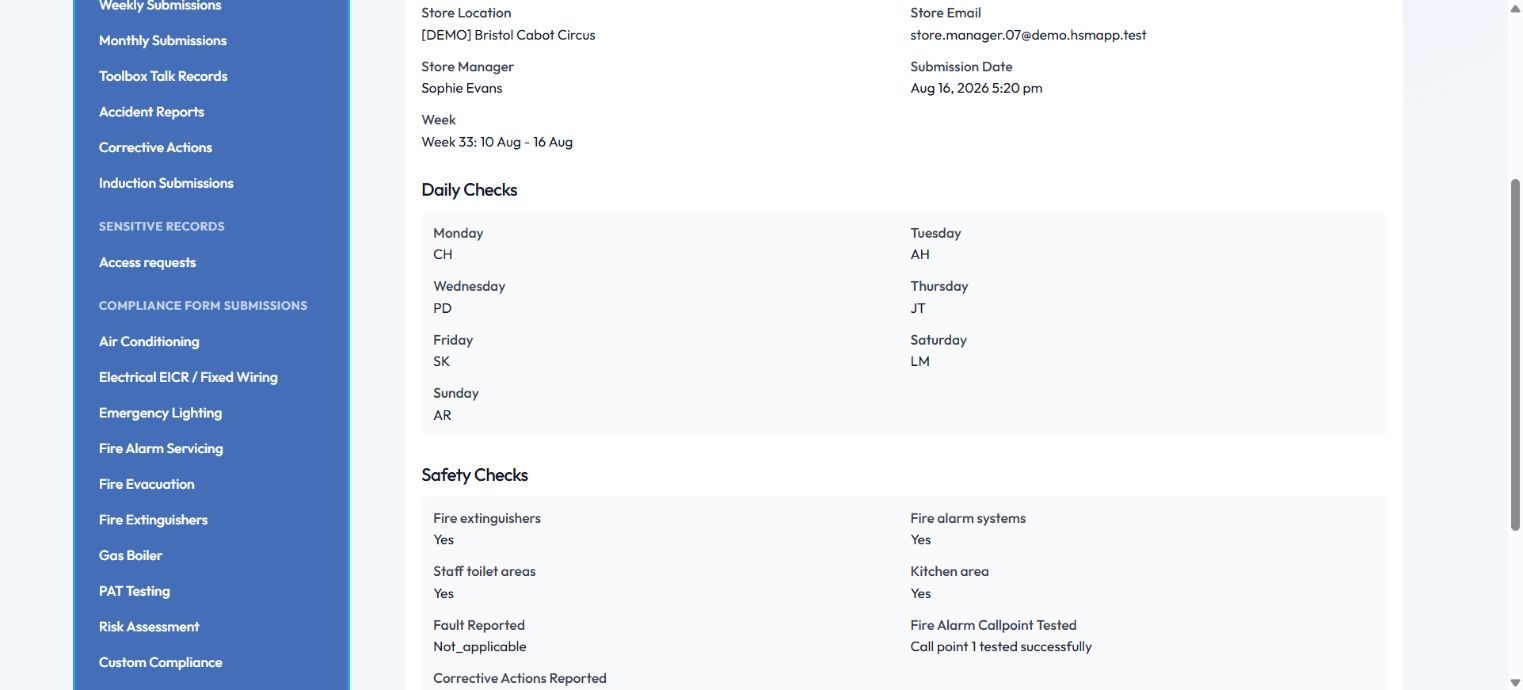
Weekly check record: A completed weekly declaration for the fictional Bristol store, using demonstration answers. Explore screenshot
A completed weekly declaration for the fictional Bristol store, using demonstration answers.

02 / MONTHLY CHECK RECORD

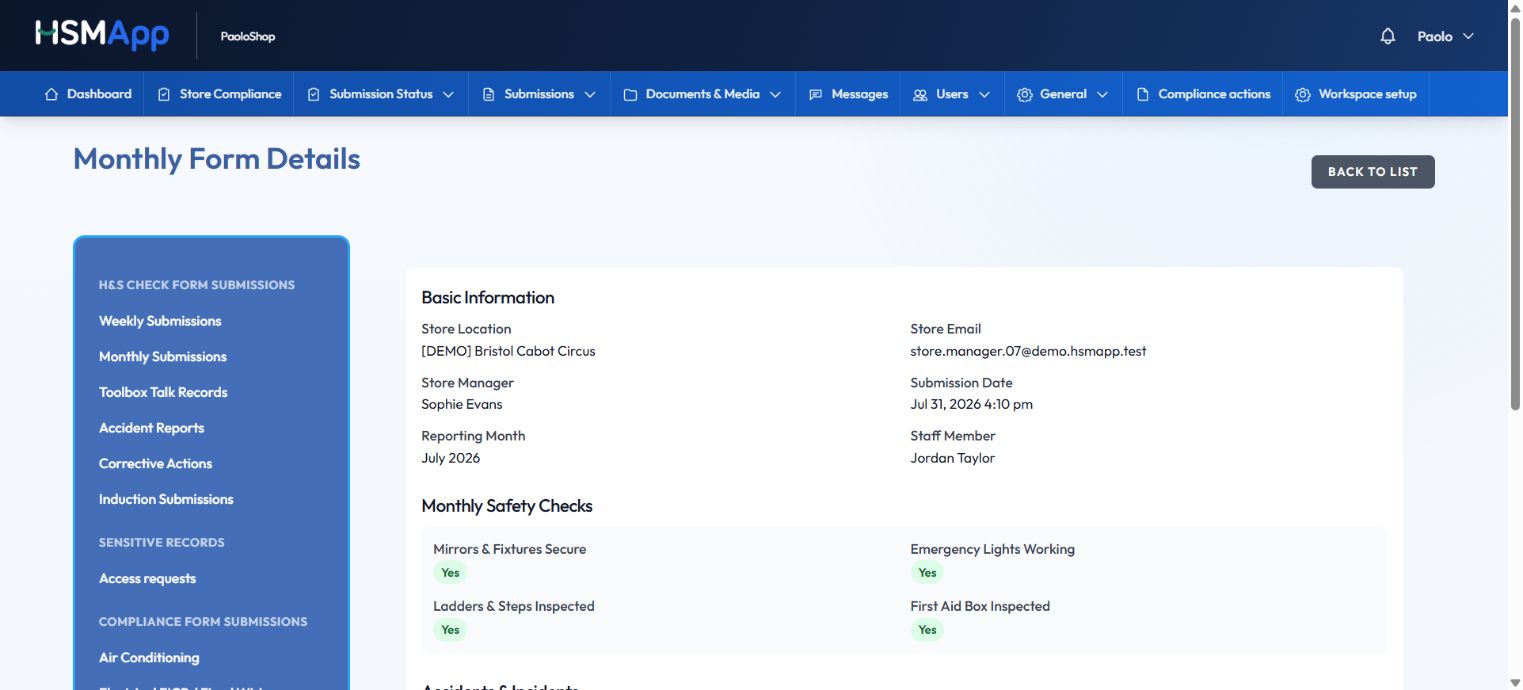
Keep the wider monthly review in view.

Monthly checks have their own record, so the bigger review does not get lost among the day-to-day returns.

  1. Confirm the reporting monthThe record keeps the month, store and staff member together.
  2. Review the specific answersSee checks such as fixtures, emergency lights, ladders and first-aid supplies in one place.
Less searching when it is time for a store review.
HSMApp Monthly check record
Monthly check record: July 2026 demonstration answers. The checklist shown is an app example, not advice on required checks. Explore screenshot
July 2026 demonstration answers. The checklist shown is an app example, not advice on required checks.

03 / TOOLBOX-TALK STATUS

Make the team briefing part of the routine.

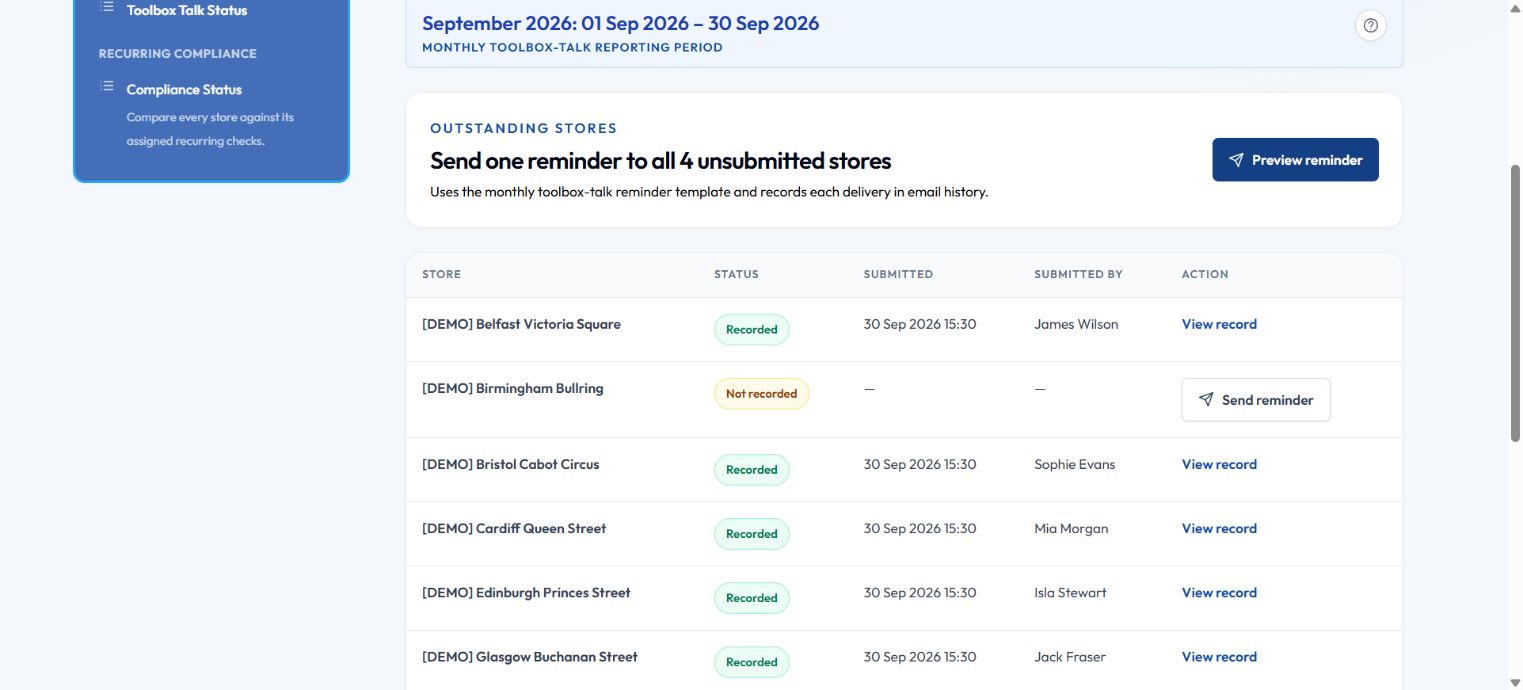
Compare the selected month’s toolbox-talk records across stores and see where a conversation or reminder is still needed.

  1. Choose the reporting monthKeep the discussion focused on the same period across the estate.
  2. Follow up selectivelyOpen a recorded return or use the reminder controls for stores still to submit.
Know where to prompt, without chasing every store.
HSMApp Toolbox-talk status
Toolbox-talk status: Fictional September reporting fixtures illustrate recorded and missing returns. No reminders were sent for this capture. Explore screenshot
Fictional September reporting fixtures illustrate recorded and missing returns. No reminders were sent for this capture.

04 / MESSAGE ACKNOWLEDGEMENT DETAIL

Know who still needs the message.

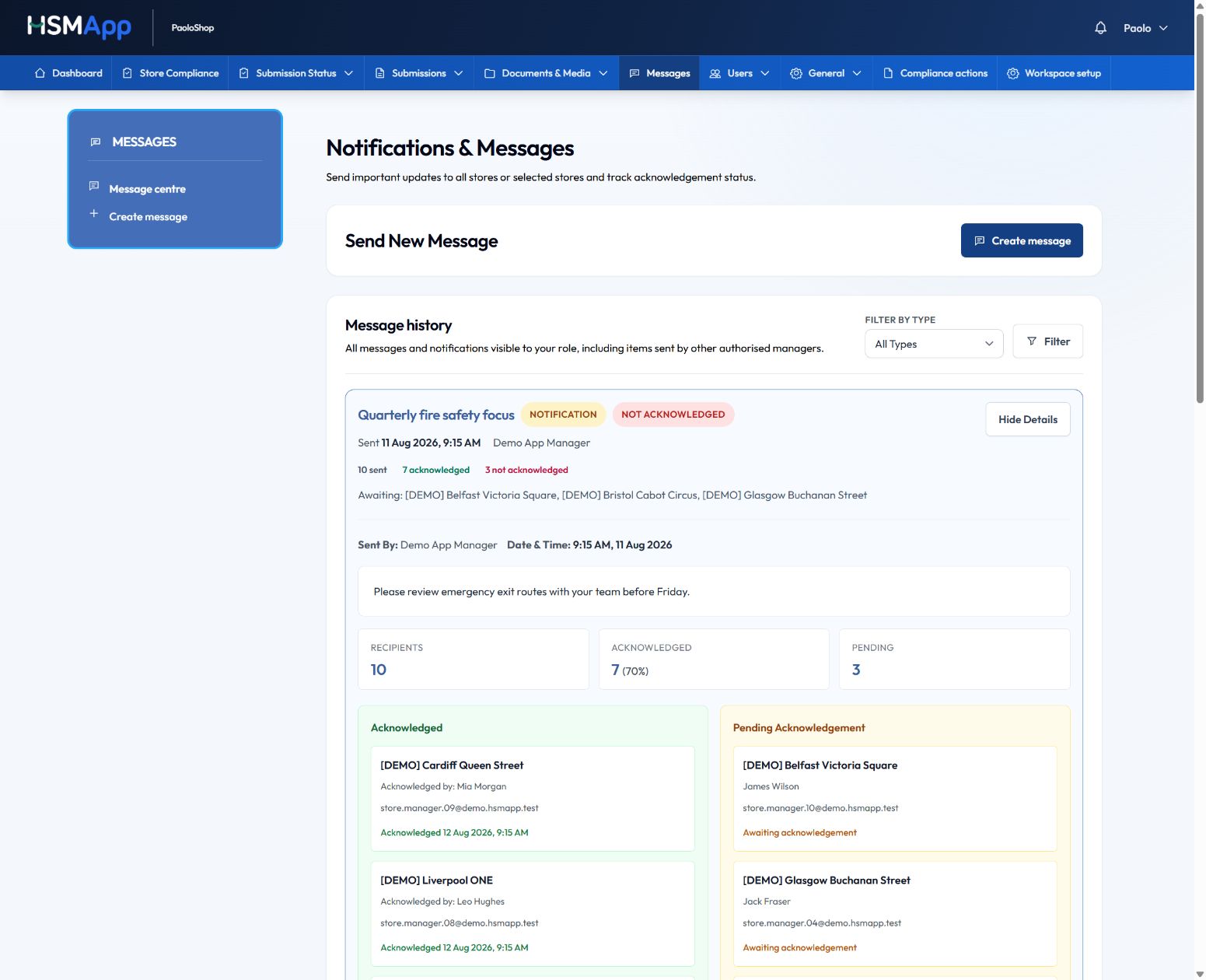
Share an important update, then see which stores have acknowledged it and which have not. Follow up with the right teams instead of sending another message to everyone.

  1. Read the update in contextKeep the subject, message and sent date with the acknowledgement record.
  2. Find the missing acknowledgementsUse the recipient status to focus your follow-up on the right stores.
Targeted follow-up, with a visible record.
HSMApp Message acknowledgement detail
Message acknowledgement detail: A demonstration fire-safety briefing, with acknowledged and pending recipients. Explore screenshot
A demonstration fire-safety briefing, with acknowledged and pending recipients.

05 / GUIDANCE LIBRARY

Give teams a familiar place to find guidance.

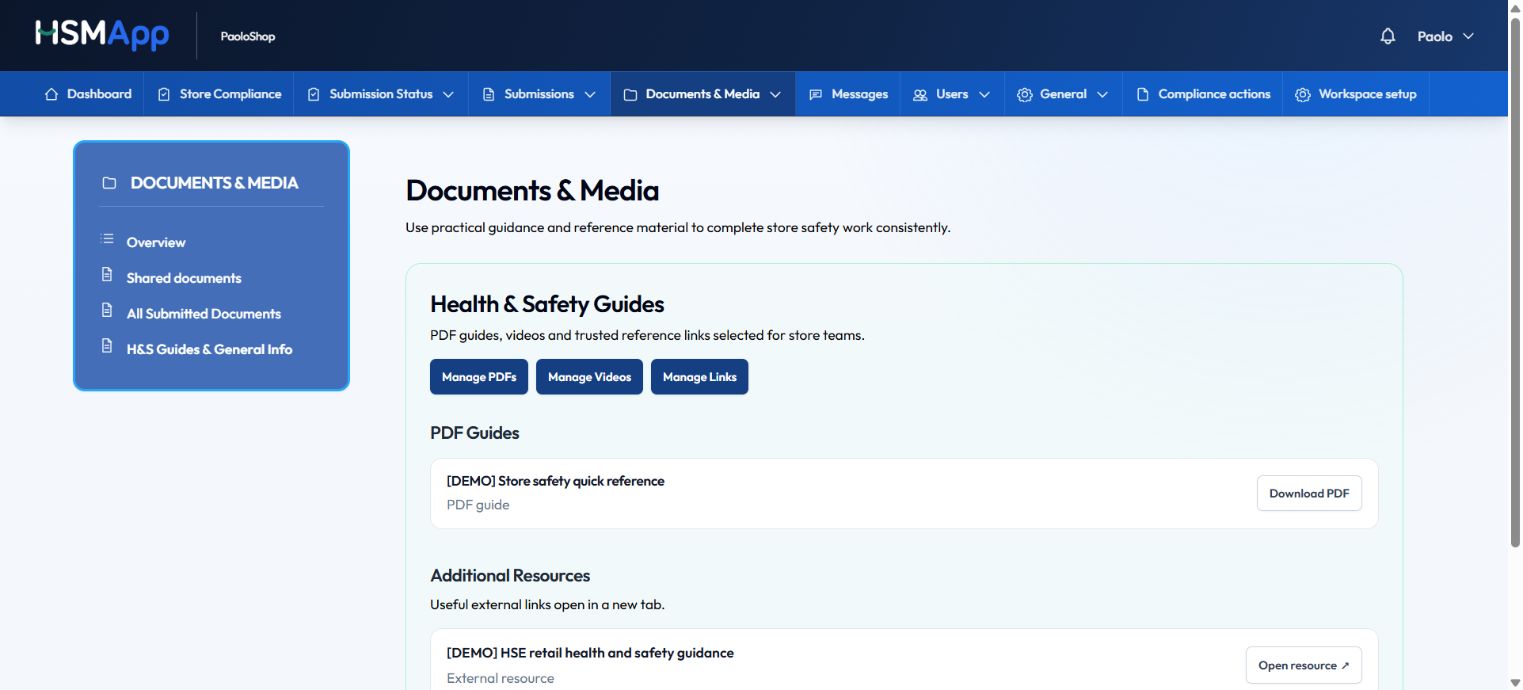
Bring reference PDFs and useful links into the documents and media workspace, so teams have a shared starting point.

  1. Find the relevant resourceBrowse the guidance library rather than searching through old email attachments.
  2. Open the sourceDownload the PDF or follow the reference link when the team needs the detail.
A clearer handover when people or shifts change.
HSMApp Guidance library
Guidance library: Demonstration PDF and reference-link entries in the guidance library. This screen does not show a client document. Explore screenshot
Demonstration PDF and reference-link entries in the guidance library. This screen does not show a client document.

06 / STORE REPORTING HISTORY

See the pattern. Not just the latest tick.

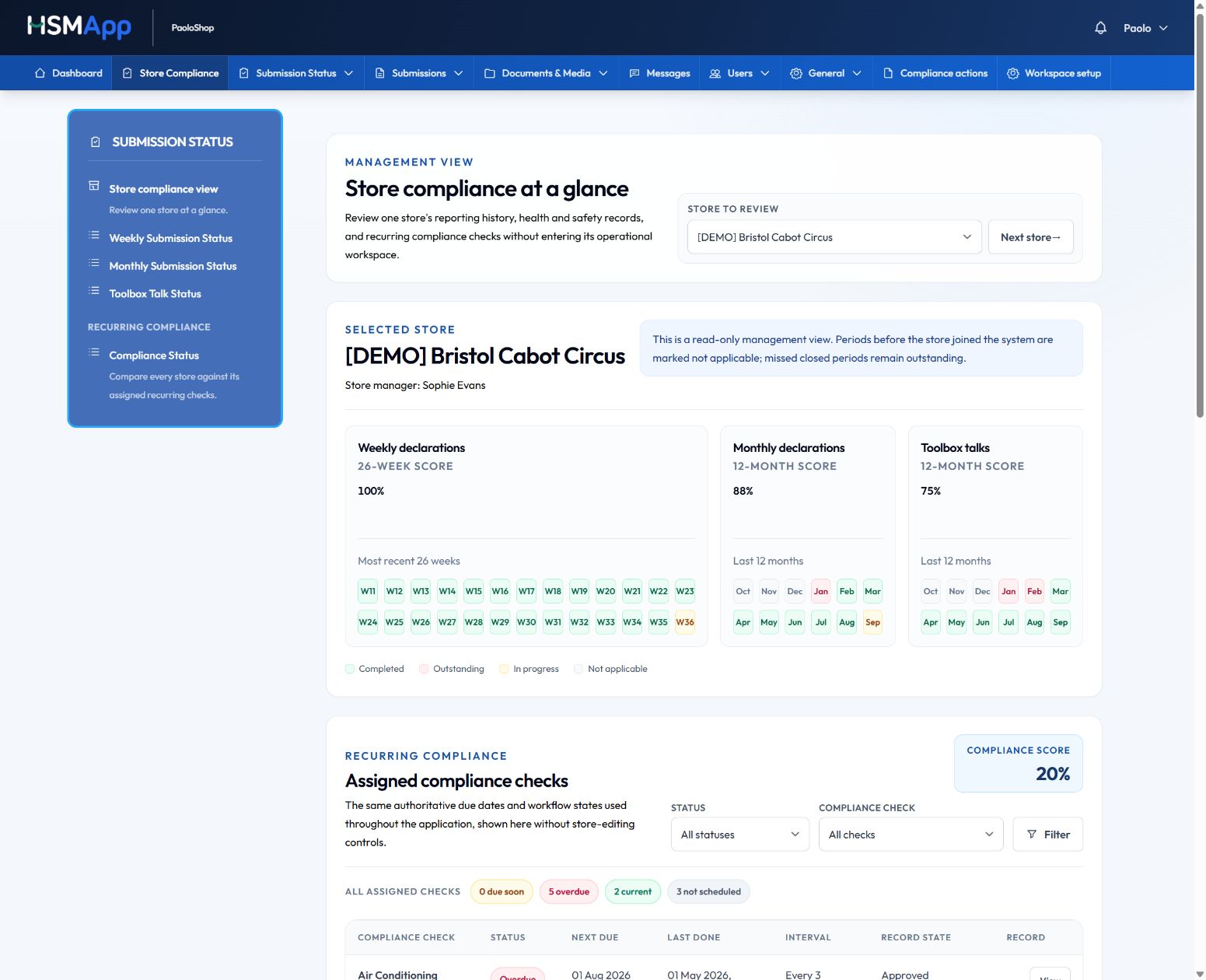
Open a store’s weekly, monthly and toolbox-talk history. Recognise consistent routines and spot the gaps that deserve a conversation.

  1. Look across reporting periodsReview weekly, monthly and toolbox-talk completion together.
  2. Spot the patternUse gaps and consistent returns to prepare a more useful area visit.
Better-prepared area visits and store reviews.
HSMApp Store reporting history
Store reporting history: Completed, outstanding and in-progress periods for a fictional Bristol store. Explore screenshot
Completed, outstanding and in-progress periods for a fictional Bristol store.

Demonstration data · Screens are not client results

Captured in an administrator demo workspace. Available tools depend on your package and role.

Talk about Store Essentials

TOUR 02 / ADD RECURRING COMPLIANCE

Compliance Core

From the due date
to the detail behind it.

Add schedules, service records and review follow-up to everything in Store Essentials. These tools are included in Compliance Core and Complete + Advice.

01 / RECURRING COMPLIANCE REGISTER

Find the next action behind the due date.

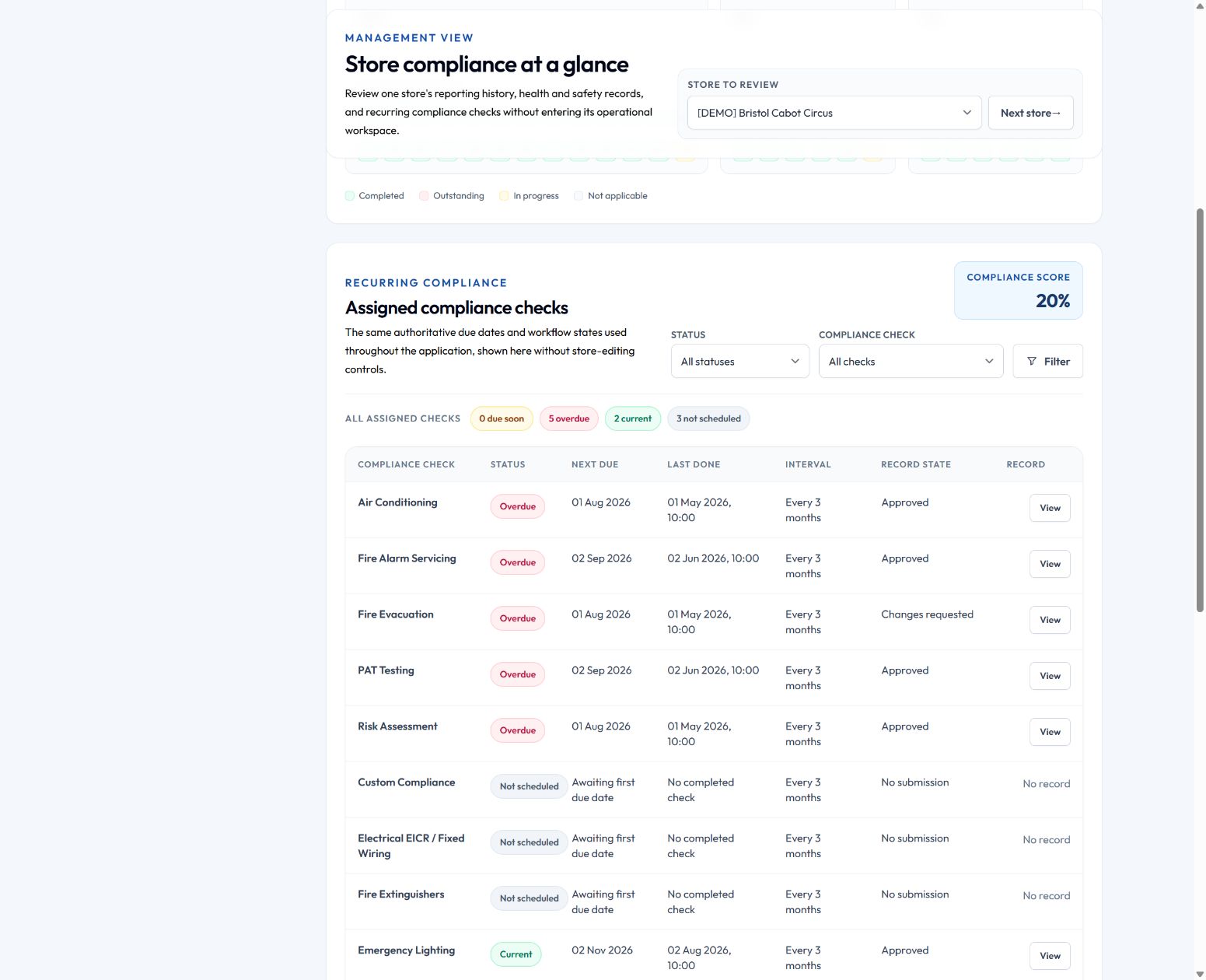
See overdue, current and unscheduled checks alongside the latest record state. Open the record to understand what happened and what still needs attention.

  1. Scan the next due dateDistinguish current, overdue and not-yet-scheduled checks.
  2. Open the record behind the statusRead the latest submission state before deciding what needs attention.
Less searching for the detail behind a status.
HSMApp Recurring compliance register
Recurring compliance register: Demo schedules, not recommended inspection intervals or evidence of a client’s performance. Explore screenshot
Demo schedules, not recommended inspection intervals or evidence of a client’s performance.

02 / SERVICE DETAILS & REFERENCES

Keep the facts behind the service together.

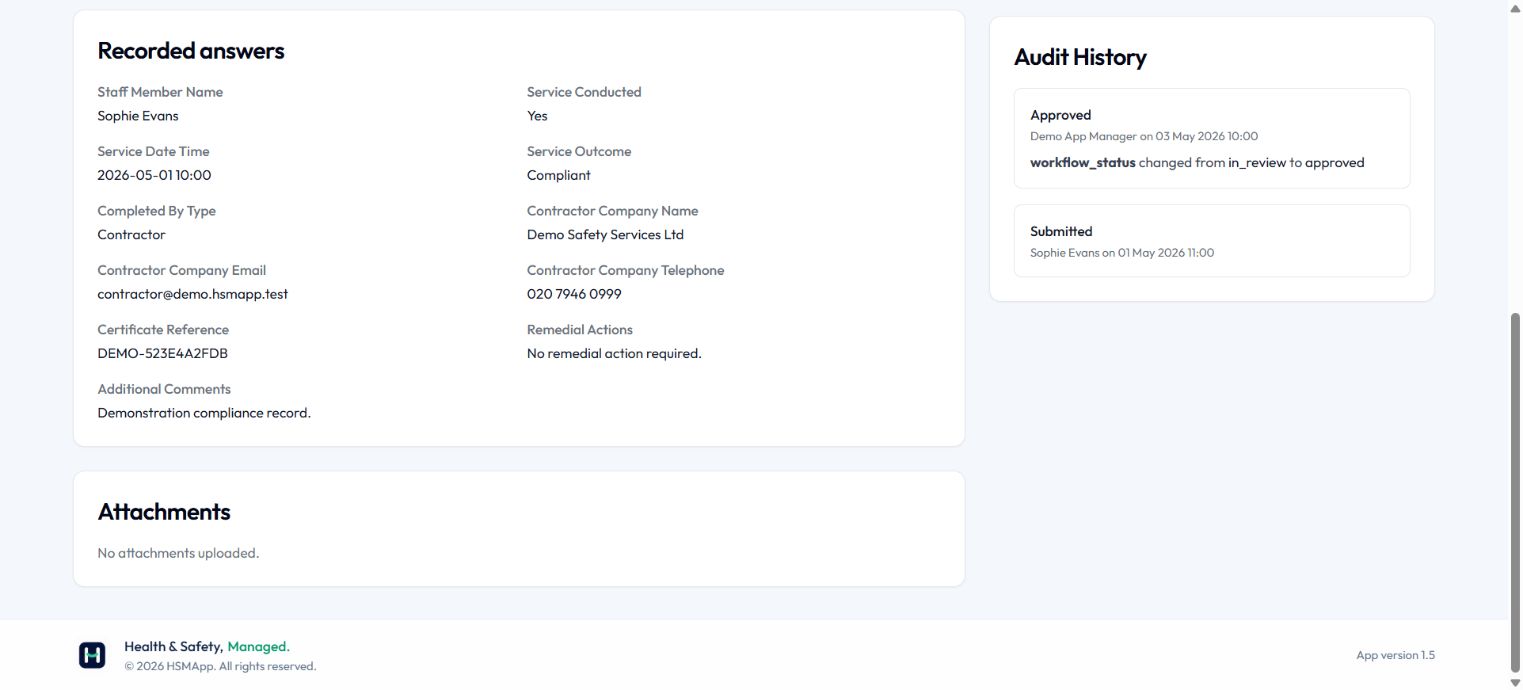
Review who did the work, when it happened, the reported outcome and the certificate reference without piecing together separate conversations.

  1. Check the service detailsThe record identifies the contractor, service date and reported outcome.
  2. Check what supports the recordReview the reference and attachment area. This demo has a reference but no uploaded file.
Less searching when someone asks what was done.
HSMApp Service details & references
Service details & references: Fictional contractor and certificate reference. No certificate is attached to this demonstration record. Explore screenshot
Fictional contractor and certificate reference. No certificate is attached to this demonstration record.

03 / CHANGES REQUESTED

Make the next step clear when something is missing.

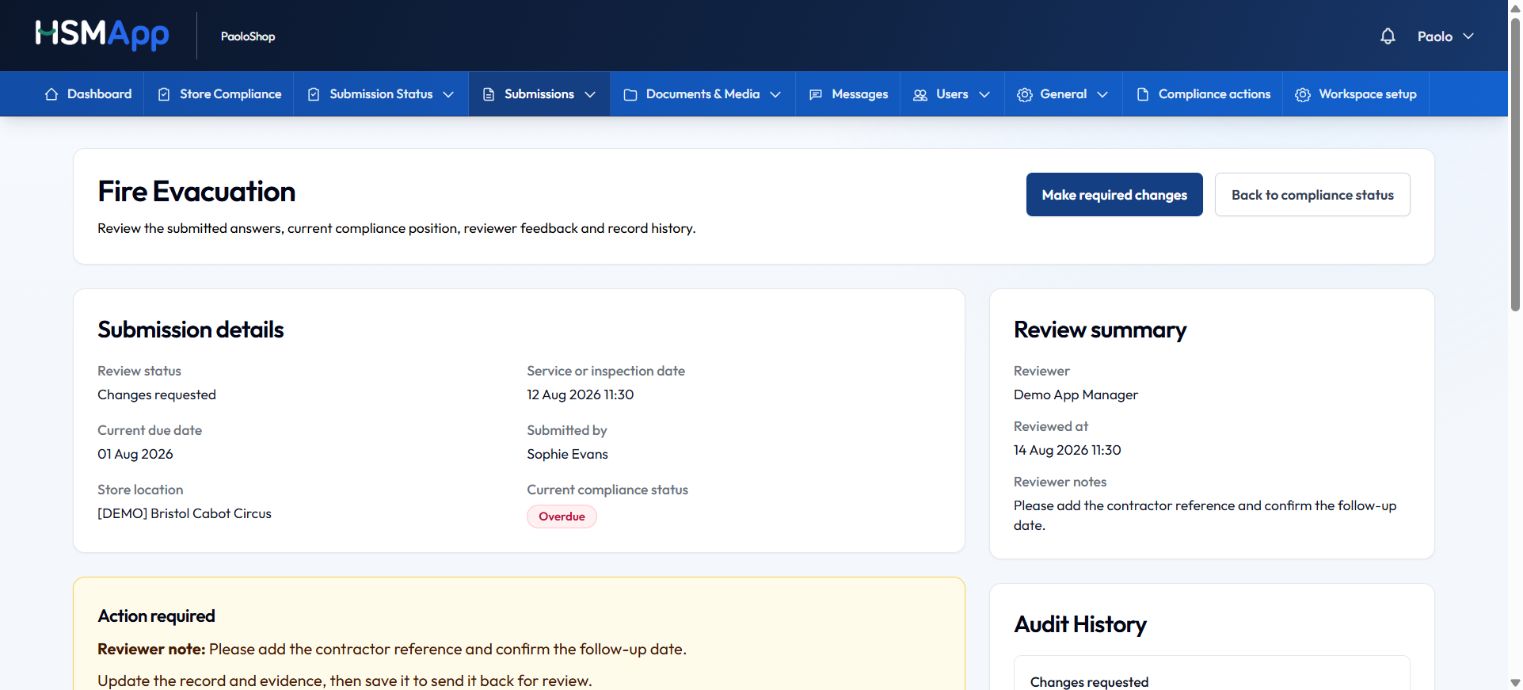
A recorded visit does not have to mean the review is complete. Keep the reviewer’s feedback visible beside the submission and its current status.

  1. Read the reviewer’s noteSee the specific information that needs to be added or confirmed.
  2. Return with the missing detailThe record points back to the changes needed before it goes through review again.
A clearer handover between the store and head office.
HSMApp Changes requested
Changes requested: A fictional Bristol record with changes requested. The screen was captured read-only; no review decision was changed. Explore screenshot
A fictional Bristol record with changes requested. The screen was captured read-only; no review decision was changed.

04 / ANSWERS & AUDIT HISTORY

Keep the context when the conversation moves on.

The answers and review history stay with the record, giving the next person a starting point that does not depend on who remembers the last call.

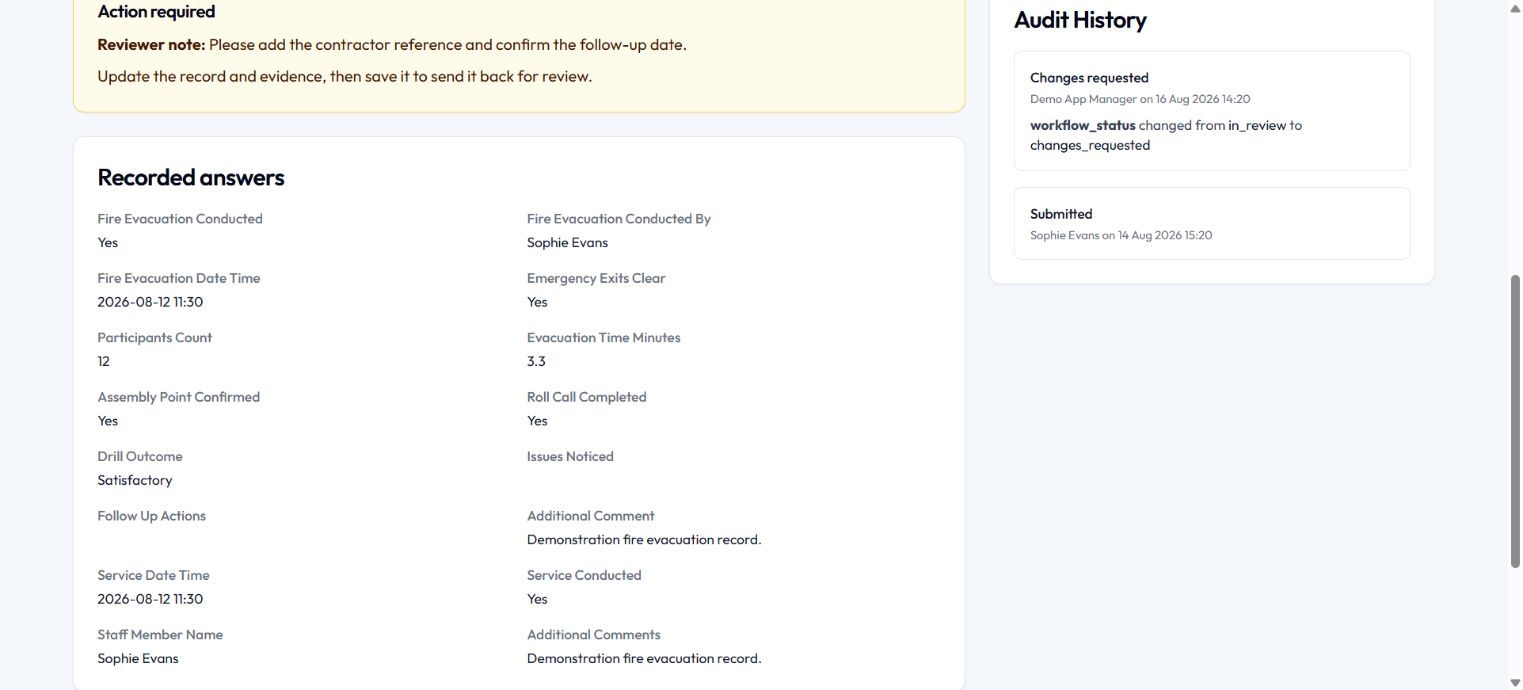
  1. Review the recorded answersUnderstand the event and its reported outcome in the same record.
  2. Follow the review trailSee who submitted the record and who requested changes, with dates alongside.
A more useful record for handovers and later reviews.
HSMApp Answers & audit history
Answers & audit history: Demonstration answers and review events, not proof of legal compliance or a client’s performance. Explore screenshot
Demonstration answers and review events, not proof of legal compliance or a client’s performance.

Demonstration data · Screens are not client results

Captured in an administrator demo workspace. Available tools depend on your package and role.

Talk about Compliance Core

CONSISTENCY STARTS ON THE SHOP FLOOR

A simpler routine.
A more useful record.

Give managers a familiar place to do the work, even when the team or the shift changes.

WEEKLY DECLARATIONS

Give every week
a clear starting point.

Bring daily initials and weekly checks into a recognisable routine. Keep the reporting period with the record, so there is no guessing which week was covered.

MONTHLY DECLARATIONS

Keep the wider
review on track.

Separate the monthly review from everyday checks. See what has been returned and where a store still needs a prompt.

TOOLBOX TALKS

Make safety part of
the team conversation.

Record the monthly talk and make completion visible alongside other store activity. Keep a useful history when teams change.

Built around interruptions. Draft saving on supported forms lets your team pick up where they left off.

FOR OPERATIONS AND AREA TEAMS

Arrive informed.
Have a better
store conversation.

A missed return is a prompt to understand what is happening, not just another number on a report.

Look at a store’s history, spot gaps and open the records behind them. Recognise consistency as well as exceptions, and focus your visit where your support will help.

Explore area-manager oversight
Reporting history for a fictional Bristol storeExplore screenshot
Weekly checks, monthly declarations and toolbox talks in one view. Demo data · Click to enlarge

THE DETAIL SHOULD NOT DEPEND ON WHO REMEMBERS

Keep the facts.
Make the next step easier.

Give your people a structured way to record events and hand over the information that matters.

ACCIDENT REPORTS

Capture it while
the detail is fresh.

Keep the event and supporting information together for the people responsible for following it up.

CORRECTIVE ACTIONS

Turn “we should”
into a useful record.

Record issues and improvement work, with context that stays available when the conversation moves on.

EMPLOYEE INDUCTIONS

Give new starters
a clearer handover.

Retain a record of the safety induction, so it does not disappear when the person who delivered it changes role.

Servicing, certificates and outstanding remedial work?Included in Compliance Core: explore compliance
A shop assistant smiling while helping a customer at the counterKEEP TEAMS CONNECTED, WHEREVER THEY WORK

THE MESSAGE DOESN’T END AT “SEND”

Share it once.
Know who needs
a follow-up.

An updated procedure is only useful if the people who need it can find it.

Give stores a shared home for guidance, documents and media. Send important updates and see who has acknowledged them. Use routine reminders and summary reports to support the weekly and monthly rhythm.

See the acknowledgement walkthrough

A HUMAN CONVERSATION. A PRACTICAL NEXT STEP.

Show us where your team gets stuck.

We’ll focus the demonstration on that workflow, whether it’s store checks, missing certificates or seeing the whole estate.

Let’s have a chat